Panduan lengkap penggunaan Claude secara maksimal, mulai dari chat biasa hingga fitur-fitur canggih seperti API, Claude Code, Artifacts, dan integrasi berbagai tools.
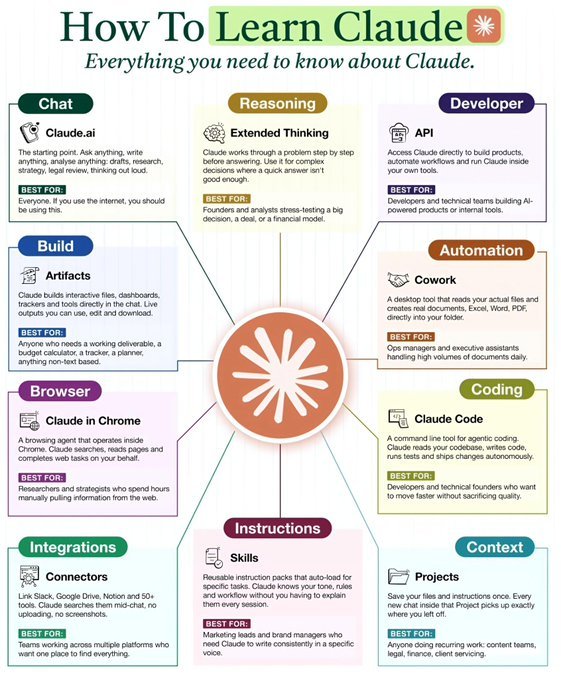
How to Learn Claude (Properly) ✳️
Most people only use Claude for chat.
They're missing 90% of what it can actually do.
Here's the complete Claude stack — explained simply:
- Chat
🔺 Claude.ai
Your default workspace for writing, research, brainstorming, analysis, and thinking out loud.
Use it like a thinking partner, not just a chatbot.
✅ Best for:
Everything. This is your daily driver.
- Reasoning
🔺 Extended Thinking
Claude slows down and works step-by-step before answering.
Perfect for complex decisions.
Use when accuracy > speed.
✅ Best for:
- Business decisions
- Strategy planning
- Financial models
- Deep analysis
- Developer
🔺 API
Run Claude inside your own product, workflow, or automation.
This is how startups build AI-native apps.
✅ Best for:
Developers building AI tools or internal automation.
- Build
🔺 Artifacts
Claude creates working tools inside chat: dashboards, trackers, calculators, mini apps.
Not just text — real usable outputs.
✅ Best for:
- Planners
- Calculators
- Dashboards
- Internal tools
- Automation
🔺 Cowork
Claude reads real files and generates documents directly into your folders.
Think: AI operations assistant.
✅ Best for:
- Document workflows
- Ops teams
- Admin automation
- Coding
🔺 Claude Code
Agentic coding from your terminal.
Claude reads your repo, writes code, runs tests, ships changes.
This is AI developer mode.
✅ Best for:
Developers who want 10x velocity.
- Browser
🔺 Claude in Chrome
Claude browses the web for you.
Searches, reads, extracts, completes tasks.
No more manual research loops.
✅ Best for:
Researchers, founders, analysts.
- Instructions
🔺 Skills
Reusable prompts that load automatically.
Claude remembers tone, style, and workflow.
No more repeating yourself.
✅ Best for:
Content teams & brand voice consistency.
- Integrations
🔺 Connectors
Connect Slack, Notion, Drive, and 50+ tools.
Claude can search them mid-chat.
Your entire workspace becomes searchable.
✅ Best for:
Teams working across multiple apps.
- Context
🔺 Projects
Persistent memory for your work.
Claude remembers files, instructions, and progress.
Every chat continues where the last one ended.
✅ Best for:
Recurring workflows & ongoing projects.
Most people use Claude like ChatGPT.
Power users use Claude like an AI operating system.
Save this. You'll need it later.